WARDOGS Anti-Cheat Error Fix — Repairing Elytra the Right Way

Published 2026-09-11Updated 2026-09-193 min read

WARDOGS switched to its own Elytra anti-cheat, and it conflicts with everything: firewalls, Vanguard, ACE, EAC and 5E. Here's the repair order.
Elytra is strict — here's how to make peace with it.

WARDOGS moved from EasyAnti-Cheat to its own Elytra anti-cheat, and Elytra checks aggressively — enough to collide with other software on your machine. Work through these in order.

1. Temporarily Disable Windows Firewall

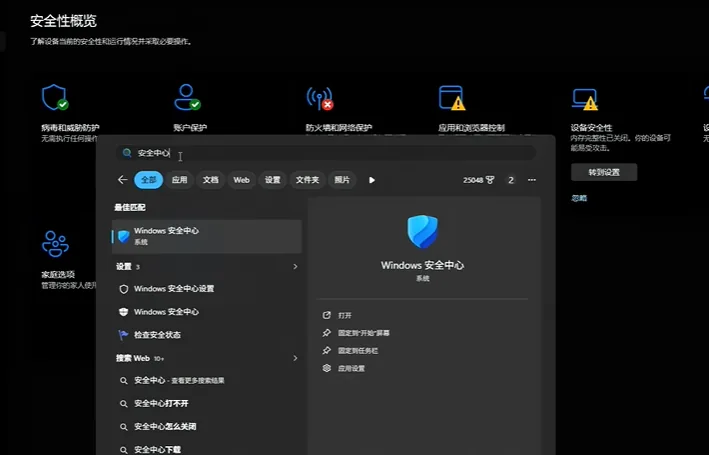
Windows Security → Firewall & network protection → turn off Domain, Private and Public firewalls. If you run a third-party security suite, let it take over protection instead of leaving the system bare.

2. Close (or Uninstall) Every Other Anti-Cheat

The most common cause, by far. Background anti-cheats that clash with Elytra:

  • Riot Vanguard
  • Tencent ACE
  • EasyAnti-Cheat (Apex and others)
  • The 5E and similar platform anti-cheats
  • Battlefield's anti-cheat

Closing the app isn't always enough — some leave services running. The stubborn cases need an uninstall plus reboot.

3. Manually Repair Elytra

  1. Steam → right-click WARDOGS → Manage → Browse local files.
  2. Open the anti-cheat folder and find the Elytra-Setup installer.
  3. Run it and choose Repair, then reboot the PC.

Between the three steps, nearly every anti-cheat error clears. If a numbered error code keeps appearing instead, check the error 114 fix and error L014 fix for the code-specific variants — and if startup crashes rather than errors, the crash fixes guide is the right ladder.

Related: crash fixes · error 114 fix · error l014 fix

Related Guides


WARDOGS Medic Leveling Guide — XP Rates and the Smoke LoopWARDOGS Logistics and Building — The Complete System OverviewWARDOGS How to Win More — Zone Control, Towers and Squad PlayBest Starting Class in WARDOGS — What New Players Should PickWARDOGS Support Fast Leveling — The Pallet Transport LoopWARDOGS Essential Tips and Tricks — Eight Habits That PayWARDOGS Base Building Basics — Blueprints, Hammers and Rookie WallsHow to Skip the WARDOGS TutorialWARDOGS Mortar Ranging — First-Shot Accuracy With Map CoordinatesWARDOGS Helicopter Flying Guide — Practice, Readouts and Safe LandingsWARDOGS Surrender Emote — How to Raise Your HandsWARDOGS Recon Leveling Guide — Marks, SKS and the MosinWARDOGS How to Invite Friends — Squad Codes and Steam JoinWARDOGS How to Add Friends — Steam Is Your Friends ListWARDOGS Hidden Achievement — Punch the InstructorWARDOGS FOB Defense Layout — Doors, Towers and the Revive TruckWARDOGS Error Code L014 Fix — Leftover Anti-Cheat FilesWARDOGS Error Code 1147405308 Fix — The Access Denied CodeWARDOGS Devilfish Drone Guide — When a $5,000 Missile Makes SenseWARDOGS Weapon Tier List — Every Gun Ranked With PricesWARDOGS Support Class Guide — Unlock Path from Hammer to C4WARDOGS Quick Buy — Rebuy Your Last Loadout InstantlyWARDOGS Mosin Nagant Loadout — The Budget Recon BuildWARDOGS Logistics Transport Guide — Crates, Pallets and ProfitWARDOGS Horn Key — Honking in VehiclesWARDOGS FOB Uses Explained — Emplacements, Super-FOBs and the DerrickWARDOGS FOB Building Guide — Hammers, Storage and Your First BaseWARDOGS Class Leveling Methods — How Every Track Earns XPWARDOGS Best Easy-Mode Weapons — M4, FAL, PKM and AMR 50WARDOGS Helicopter Controls — Keyboard Setup That Actually WorksWARDOGS Fast Money Guide — Get Rich Without Being GoodWARDOGS Best Graphics Settings — See Far, Run FastWARDOGS Beginner Guide — Core Mechanics, Money and First LivesWARDOGS Assault Starter Guide — Free Rifles, T-21 and the AK74WARDOGS Access Denied Fix — Account, Region and Anti-Cheat CausesWARDOGS How to Team Up — Squad Codes ExplainedWARDOGS Crash Fixes — Every Startup Problem and Its Fix