WARDOGS Error Code 1147405308 Fix — The Access Denied Code

Published 2026-09-15Updated 2026-09-193 min read

Error 1147405308 in WARDOGS means the Elytra anti-cheat handshake failed: clear conflicting anti-cheats, disable memory integrity, verify files.
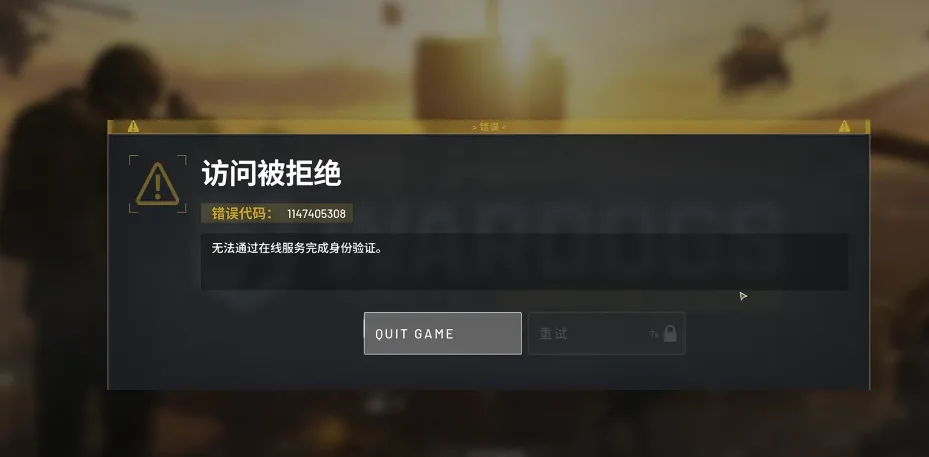
A long code with a short fix list.

Logging into WARDOGS and getting "access denied" with error code 1147405308? The code fires when another anti-cheat on your machine blocks the game's own handshake. Clear it in three steps.

1. Clear Conflicting Anti-Cheats

From Task Manager, end every other game's anti-cheat service:

  • Riot Vanguard
  • Tencent ACE
  • EasyAnti-Cheat
  • The 5E platform anti-cheat

Residual services interfere with authentication even when their apps are closed. While you're at it: shut down cheat tools, memory editors and idle game platforms entirely.

2. Turn Off Windows Memory Integrity

Windows Core Isolation (Memory Integrity) intercepts WARDOGS' own Elytra anti-cheat during authentication. Windows Security → Device Security → Core isolation details → Memory Integrity off. (It's the same switch that fixes startup freezes — see crash fixes.)

3. Repair the Install and the Launcher

  • Steam → right-click WARDOGS → Properties → Installed Files → Verify integrity of game files.
  • Exit Steam completely — including the system tray — then relaunch Steam as administrator and start the game.
  • Update the client if Steam offers it: outdated builds fail authentication by design.

That combination clears 1147405308 for most players. If a slightly different code appears instead, the error L014 fix and the general anti-cheat error guide cover the neighboring cases.

Related: error l014 fix · anticheat error fix · access denied fix

Related Guides


WARDOGS Medic Leveling Guide — XP Rates and the Smoke LoopWARDOGS Logistics and Building — The Complete System OverviewWARDOGS How to Win More — Zone Control, Towers and Squad PlayBest Starting Class in WARDOGS — What New Players Should PickWARDOGS Support Fast Leveling — The Pallet Transport LoopWARDOGS Essential Tips and Tricks — Eight Habits That PayWARDOGS Base Building Basics — Blueprints, Hammers and Rookie WallsHow to Skip the WARDOGS TutorialWARDOGS Mortar Ranging — First-Shot Accuracy With Map CoordinatesWARDOGS Helicopter Flying Guide — Practice, Readouts and Safe LandingsWARDOGS Surrender Emote — How to Raise Your HandsWARDOGS Recon Leveling Guide — Marks, SKS and the MosinWARDOGS How to Invite Friends — Squad Codes and Steam JoinWARDOGS How to Add Friends — Steam Is Your Friends ListWARDOGS Hidden Achievement — Punch the InstructorWARDOGS FOB Defense Layout — Doors, Towers and the Revive TruckWARDOGS Error Code L014 Fix — Leftover Anti-Cheat FilesWARDOGS Devilfish Drone Guide — When a $5,000 Missile Makes SenseWARDOGS Weapon Tier List — Every Gun Ranked With PricesWARDOGS Support Class Guide — Unlock Path from Hammer to C4WARDOGS Quick Buy — Rebuy Your Last Loadout InstantlyWARDOGS Mosin Nagant Loadout — The Budget Recon BuildWARDOGS Logistics Transport Guide — Crates, Pallets and ProfitWARDOGS Horn Key — Honking in VehiclesWARDOGS FOB Uses Explained — Emplacements, Super-FOBs and the DerrickWARDOGS FOB Building Guide — Hammers, Storage and Your First BaseWARDOGS Class Leveling Methods — How Every Track Earns XPWARDOGS Best Easy-Mode Weapons — M4, FAL, PKM and AMR 50WARDOGS Helicopter Controls — Keyboard Setup That Actually WorksWARDOGS Fast Money Guide — Get Rich Without Being GoodWARDOGS Best Graphics Settings — See Far, Run FastWARDOGS Beginner Guide — Core Mechanics, Money and First LivesWARDOGS Assault Starter Guide — Free Rifles, T-21 and the AK74WARDOGS Anti-Cheat Error Fix — Repairing Elytra the Right WayWARDOGS Access Denied Fix — Account, Region and Anti-Cheat CausesWARDOGS How to Team Up — Squad Codes ExplainedWARDOGS Crash Fixes — Every Startup Problem and Its Fix